Security & Privacy12 min read
Shadow IT and PDF Tools: How Unapproved Uploads Can Expose Confidential Data
Loading guide content...…
By StayInBrowser · Published August 16, 2026
While the convenience is understandable and the employee's intent is to be productive, uploading confidential documents to unvetted third-party web services can create significant governance and third-party risk. This is particularly relevant when those files contain Non-Disclosure Agreements (NDAs), customer contracts, employee performance records, financial statements, healthcare information (PHI), personally identifiable information (PII), or proprietary source-code documentation.
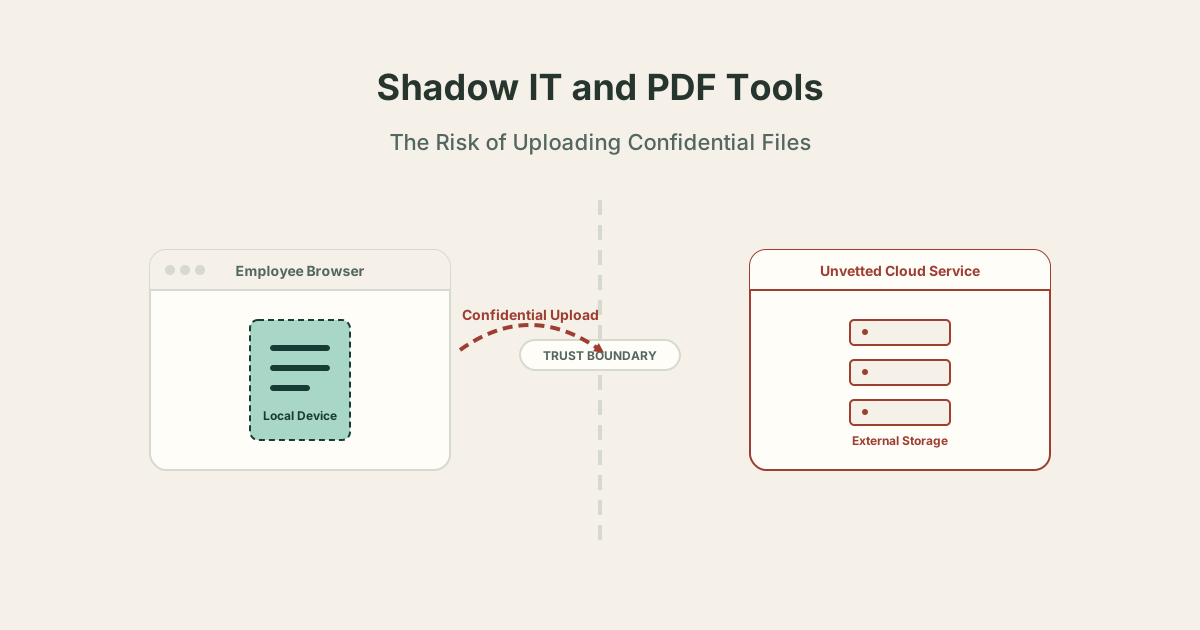
In modern corporate environments, employees frequently need to handle everyday document tasks: merging PDFs, compressing large files for email limits, signing agreements, redacting sensitive information, or extracting specific pages for stakeholders. When approved corporate software is unavailable, overly complex, or requires tedious VPN connections, employees look for faster solutions. Often, they turn to consumer search engines.
They might search for a "free online PDF tool" or "split PDF online," and click the first result. In their haste to complete a task, they upload their document without fully evaluating how that third-party service handles the file, where the servers are located, or what the retention policy states. This behavior—adopting unauthorized tools to solve legitimate business problems because the approved tools cause friction—is an example of Shadow IT.
Historically, Shadow IT was associated with employees physically installing unauthorized software via CD-ROMs or USB drives on corporate devices, or department heads purchasing unsanctioned SaaS subscriptions. However, discovering and using a free web application through Google for a one-off task is just as relevant.
If corporate information is processed through an unapproved web service, it may fall outside some approved controls, vendor-review processes, monitoring, contractual protections, or data-governance procedures, depending on how an organization has configured its environment. (Some organizations may still have secure web gateways, CASB/SSE controls, endpoint telemetry, DLP, or DNS monitoring that provide visibility, but unapproved tools generally bypass structured data governance).
Consider an example scenario: an employee receives a signed contract named Acquisition-NDA-Final.pdf. They need to forward pages 4 through 7 to another team, but the legal terms on the other pages must remain confidential.
The employee’s intent is legitimate, but the unauthorized data transfer in the first workflow creates third-party risk. The sensitive corporate data leaves the controlled environment and enters the infrastructure of an unknown third party.
A persistent misconception is that a padlock icon (HTTPS) means a file is completely "secure" and private. It is critical to distinguish between data being encrypted in transit and data never being transmitted for processing.
Document bytes cross the network trust boundary.
The sensitive document content is never transmitted.
In a traditional hosted web tool architecture, the data must physically leave the user's device. Once the file reaches third-party infrastructure, it is decrypted for processing. Depending on the provider's architecture, this may involve temporary storage, subprocessors, application logging, or backups.
In a local-processing architecture, a web application can still make ordinary network requests for application code, analytics, fonts, or updates. The essential nuance is that the sensitive document content is never transmitted for processing.
A PDF (Portable Document Format) is a complex container. Uploading a seemingly "sanitized" document might inadvertently expose internal operational data because a PDF may contain much more than visible page graphics.
Drawing a black rectangle over text using an image editor or basic PDF tool is not necessarily secure redaction. At a conceptual level, the underlying text, object, or OCR layer may remain fully recoverable unless the content itself is actually removed from the document structure or the affected region is securely flattened.
If you need to properly sanitize a document, consider using a dedicated workflow like the StayInBrowser Redact PDF tool.
When an employee bypasses policy and uses an external online tool, they expose the organization to several categories of risk.
A sensitive file leaves the controlled corporate boundary. Once uploaded, the organization loses technical control over who can view, copy, or retain the document.
The organization has no contractual agreement, Data Processing Agreement (DPA), or security review relationship with the service provider.
International personal-data transfers can be permitted when relevant GDPR transfer requirements and safeguards are satisfied (such as adequacy mechanisms or Standard Contractual Clauses, as outlined by the European Commission). However, using an unvetted cloud tool often means data location requirements cannot be configured or audited.
Contractual obligations, vendor requirements, and applicable privacy laws depend heavily on the organization, data classification, and jurisdiction. For example, covered entities can use cloud providers for ePHI when applicable HIPAA requirements are satisfied, including appropriate Business Associate Agreements (BAAs). Uploading protected data to an unvetted service without these safeguards in place is problematic.
To demonstrate the difference between local and server-side processing, we performed a reproducible browser Network inspection using the StayInBrowser Extract PDF Pages tool.
pdf-lib and a PDF.js worker) to perform the client-side manipulation.The document bytes were never transmitted to an application processing endpoint. You can reproduce this exact empirical test yourself using your browser's Developer Tools.
It is essential to state clearly: local processing is a data-minimization architecture choice, not a security certification. It reduces one category of third-party data transfer without eliminating every security risk.
Local processing does not protect against:
A local tool operates within the constraints of the browser's memory sandbox and the security of the underlying operating system.
Security teams evaluating SaaS or web tools should establish a practical baseline for vendor review.
Providing employees with a clear framework helps them make better decisions when approved tools are unavailable. Note: Always use your organization's actual data-classification policy.
| Classification | Example Content | External Processing Guidelines |
|---|---|---|
| Public | Published brochure, press release | Lower confidentiality concern, still verify service terms. |
| Internal | Routine internal process doc | Follow company policy regarding unapproved software. |
| Confidential | Customer contract, pricing, employee data | Approved processing strongly preferred. Use local tools if approved alternative is unavailable. |
| Restricted | Credentials, regulated records, M&A material | Use only organization-approved workflows and security guidance. |
Claims in this article were checked against authoritative security and privacy guidance from organizations like NIST and HHS. The StayInBrowser behavior described was verified against the actual implementation via reproducible browser testing. Fictional scenarios are intended purely as illustrative examples.